

Connect Grok
Create and update opportunities, clients, suppliers, contacts, leads and notes from Grok, as yourself, in the company you choose.
Grok reaches Costimate through the same connector as ChatGPT. Paste a tender email into Grok and say "create this opportunity in Costimate", or "the closing moved to 3 November". Grok does it in Costimate, as you, and answers with the link.
Connecting Grok is part of Costimate's paid plans. On Grok's side, custom connectors are part of its paid plans too, and on Grok Business your admin may have to allow the connector first.
What it can do
The same as ChatGPT:
- it reads your opportunities, clients, suppliers, contacts, leads and notes as you see them, with no price you may not read;
- it creates and changes them with the same rules as Costimate's own forms, the suppliers you buy from and the people at a client or supplier included;
- it moves an opportunity to another stage, and a move that needs an approver still waits for one;
- it calls work off a framework;
- it never deletes anything, and never approves or prices.
See Connect ChatGPT for the details.
Grok does not pass Costimate the files you attach in a chat. It can add only a small file whose content it sends itself, so add tender documents in Costimate.
Connect it
- In Costimate, open Settings › Security › Connected apps and copy the server address.
- In Grok, open Connectors › New connector › Custom, name it "Costimate" and give the address.
- Grok opens Costimate: sign in, choose the company it should work in, and Allow.
Grok changes its screens from time to time; its help pages have the current ones.
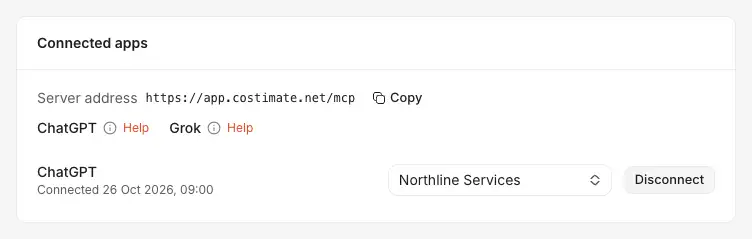
- The server address to give Grok.
- Copy copies it.
- Help beside each app opens its page of these docs.
- An app you connected (ChatGPT, here), with the company it works in, which you can change. Grok is listed the same way.
- Disconnect stops it at once.
What it made
Everything Grok creates carries the same purple mark as ChatGPT's, and its words say Grok: hover it to see who created it through Grok, and when. The Created via filter of the lists of opportunities, clients, suppliers, contacts, leads and notes offers Grok beside Costimate and ChatGPT.
Log an email on a bid
With your mailbox connected in the same app, say "find the clarification email from UNDP about RFP-2026-114 and log it on the opportunity". The app logs it on the opportunity's Activity tab, as ChatGPT does: who it was from and to, when, its subject, a summary and its text, never its attachments. Amounts in it are shown only to people who can see that bid's prices. Costimate never reads your mailbox itself.
Disconnect it
As for ChatGPT: your own connection under Settings › Security › Connected apps, the whole company's under Company profile › AI connectors.
What Grok reads goes to xAI under your own Grok account and its terms. See What AI does here, and never does, Security and your data and the Privacy Policy.